Orchestrating Autonomous Agent Networks
Automate complex workflows with task-oriented networks, graph-based execution, and self-optimizing agent formations.
A Python framework for building autonomous agent networks with multi-step reasoning. Automated formation, TaskGraph orchestration, and model-agnostic optimization.
Primary Features
- Autonomous Agent Formations (Solo, Supervising, Squad, Random)
- Graph-Based Task Execution via TaskGraph (Nodes & Edges)
- Model-Agnostic LLM Curation with LiteLLM integration
- Advanced Memory Management using mem0ai and Chroma DB
- Built-in RAG Support and External Tooling via Composio
- Automated Workflow Optimization and Dependency Resolution
Agent Network
When multiple agents handle a task, agents will adapt to specific network formation based on the task and network complexity.
You can specify a desired formation or allow the leader to determine it autonomously (default).
| Solo Agent | Supervising | Squad | Random | |
|---|---|---|---|---|
| Formation | 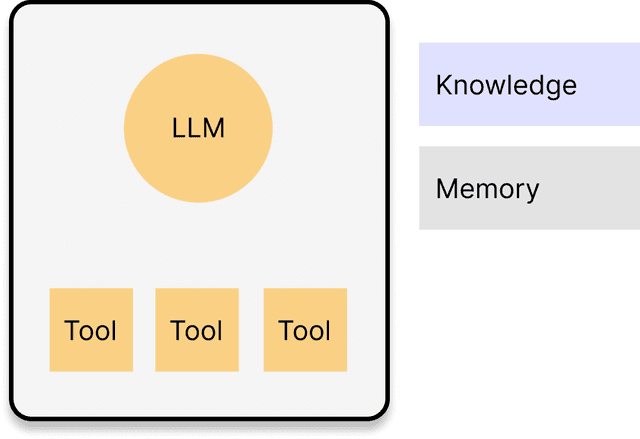 | 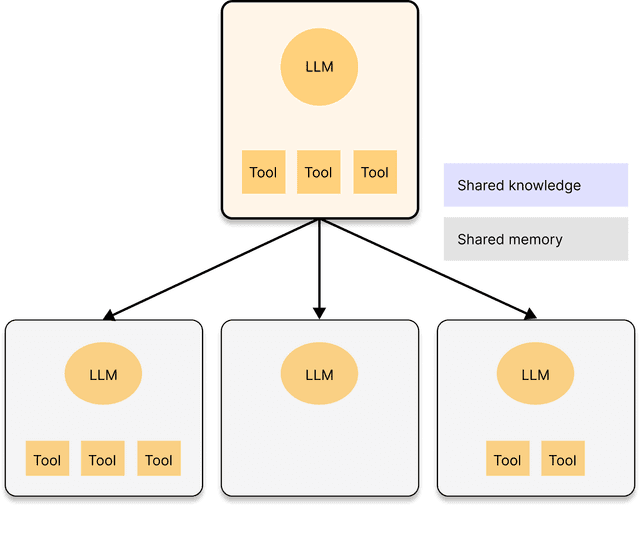 | 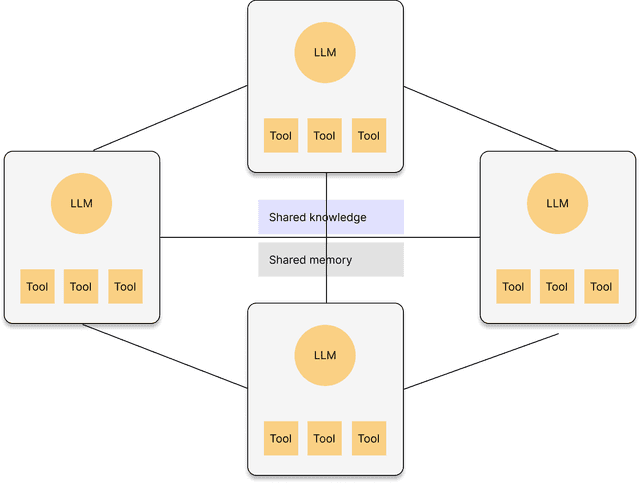 | 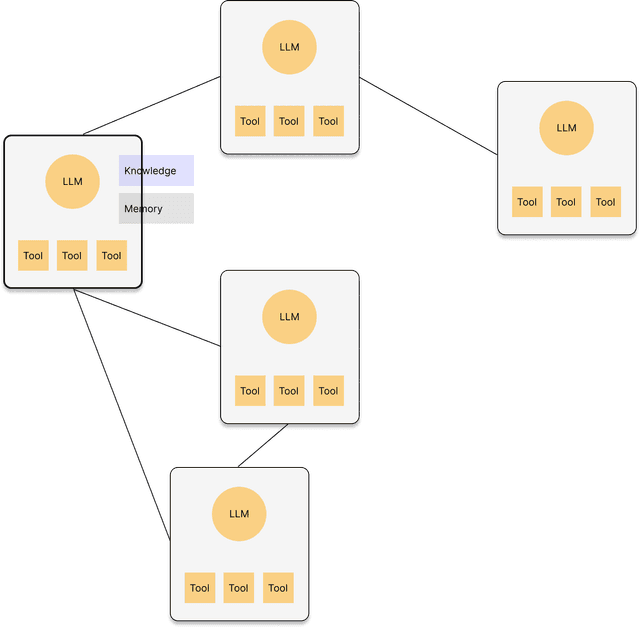 |
| Usage |
|
|
|
|
| Use case | An email agent drafts promo message for the given audience. | The leader agent strategizes an outbound campaign plan and assigns components such as media mix or message creation to subordinate agents. | An email agent and social media agent share the product knowledge and deploy multi-channel outbound campaign. | 1. An email agent drafts promo message for the given audience, asking insights on tones from other email agents which oversee other clusters. 2. An agent calls the external agent to deploy the campaign. |
Quick Start
◼ Installing Python SDK
1pip install versionhq
2
(Python 3.11 | 3.12 | 3.13)
◼ Forming Agent Network
You can generate a network of multiple agents depending on your task complexity:
1import versionhq as vhq
2
3network = vhq.form_agent_network(
4   task="YOUR AMAZING TASK OVERVIEW",
5   expected_outcome="YOUR OUTCOME EXPECTATION",
6)
7res, _ = network.launch()
8
This will form a network with multiple agents on Formation and return results as a TaskOutput object, storing outputs in JSON, plane text, Pydantic model formats along with evaluation.
◼ Instantiating AI Agents
If you don't need to form a network or assign a specific agent to the network, you can simply build an agent using Agent model.
Agents can execute tasks using Task model and return JSON format by default with plane text and pydantic model formats as options.
1import versionhq as vhq
2from pydantic import BaseModel
3
4class CustomOutput(BaseModel):
5   test1: str
6   test2: list[str]
7
8def dummy_func(message: str, **kwargs) -> str:
9   test1 = kwargs["test1"] if kwargs and "test1" in kwargs else ""
10   test2 = kwargs["test2"] if kwargs and "test2" in kwargs else ""
11   if test1 and test2:
12      return f"""{message}: {test1}, {", ".join(test2)}"""
13
14agent = vhq.Agent(role="demo manager")
15
16task = vhq.Task(
17   description="Amazing task",
18   response_schema=CustomOutput,
19   callback=dummy_func,
20   callback_kwargs=dict(message="Hi! Here is the result: ")
21)
22
23res = task.execute(agent=agent, context="amazing context to consider.")
24
25assert isinstance(res, vhq.TaskOutput)
26
This will return a TaskOutput object that stores response in plane text, JSON, and Pydantic model: CustomOutput formats with a callback result, tool output (if given), and evaluation results (if given).
1res == TaskOutput(
2   task_id=UUID('<TASK UUID>'),
3   raw='{\"test1\":\"random str\", \"test2\":[\"str item 1\", \"str item 2\", \"str item 3\"]}',
4   json_dict={'test1': 'random str', 'test2': ['str item 1', 'str item 2', 'str item 3']},
5   pydantic=<class '__main__.CustomOutput'>,
6   tool_output=None,
7   callback_output='Hi! Here is the result: random str, str item 1, str item 2, str item 3', # returned a plain text summary
8   evaluation=None
9)
10
◼ Supervising Agents
To create an agent network with one or more manager agents, designate members using the is_manager tag.
1import versionhq as vhq
2
3agent_a = vhq.Agent(role="agent a", goal="My amazing goals", llm="llm-of-your-choice")
4agent_b = vhq.Agent(role="agent b", goal="My amazing goals", llm="llm-of-your-choice")
5
6task_1 = vhq.Task(
7   description="Analyze the client's business model.",
8   response_schema=[vhq.ResponseField(title="test1", data_type=str, required=True),],
9   allow_delegation=True
10)
11
12task_2 = vhq.Task(
13   description="Define a cohort.",
14   response_schema=[vhq.ResponseField(title="test1", data_type=int, required=True),],
15   allow_delegation=False
16)
17
18network =vhq.AgentNetwork(
19   members=[
20      vhq.Member(agent=agent_a, is_manager=False, tasks=[task_1]),
21      vhq.Member(agent=agent_b, is_manager=True, tasks=[task_2]), # Agent B as a manager
22   ],
23)
24res, _ = network.launch()
25
26assert isinstance(res, vhq.NetworkOutput)
27assert "agent b" in task_1.processed_agents # agent_b delegated by agent_a
28assert "agent b" in task_2.processed_agents
29
This will return a list with dictionaries with keys defined in the ResponseField of each task.
Tasks can be delegated to a manager, peers within the agent network, or a completely new agent.
Shipping AI Systems?
I help teams design and deploy scalable ML / RAG / LLM pipelines and MLOps infrastructure.
Or explore:
- Dive deeper 👉 Research Archive
- Learn by building 👉 AI Engineering Masterclass
- Try it live 👉 Playground
Graph Theory Concept
To completely automate task workflows, agents will build a task-oriented network by generating nodes that represent tasks and connecting them with dependency-defining edges.
Each node is triggered by specific events and executed by an assigned agent once all dependencies are met.
While the network automatically reconfigures itself, you retain the ability to direct the agents using should_reform variable.
The following code snippet explicitly demonstrates the TaskGraph and its visualization, saving the diagram to the uploads directory.
1import versionhq as vhq
2
3task_graph = vhq.TaskGraph(directed=False, should_reform=True) # triggering auto formation
4
5task_a = vhq.Task(description="Research Topic")
6task_b = vhq.Task(description="Outline Post")
7task_c = vhq.Task(description="Write First Draft")
8
9node_a = task_graph.add_task(task=task_a)
10node_b = task_graph.add_task(task=task_b)
11node_c = task_graph.add_task(task=task_c)
12
13task_graph.add_dependency(
14   node_a.identifier, node_b.identifier,
15   dependency_type=vhq.DependencyType.FINISH_TO_START, weight=5, description="B depends on A"
16)
17task_graph.add_dependency(
18   node_a.identifier, node_c.identifier,
19   dependency_type=vhq.DependencyType.FINISH_TO_FINISH, lag=1, required=False, weight=3
20)
21
22# To visualize the graph:
23task_graph.visualize()
24
25# To start executing nodes:
26latest_output, outputs = task_graph.activate()
27
28assert isinstance(last_task_output, vhq.TaskOutput)
29assert [k in task_graph.nodes.keys() and v and isinstance(v, vhq.TaskOutput) for k, v in outputs.items()]
30
Task Graph
A TaskGraph represents tasks as nodes and their execution dependencies as edges, automating rule-based execution.
Agent Networks can handle TaskGraph objects by optimizing their formations.
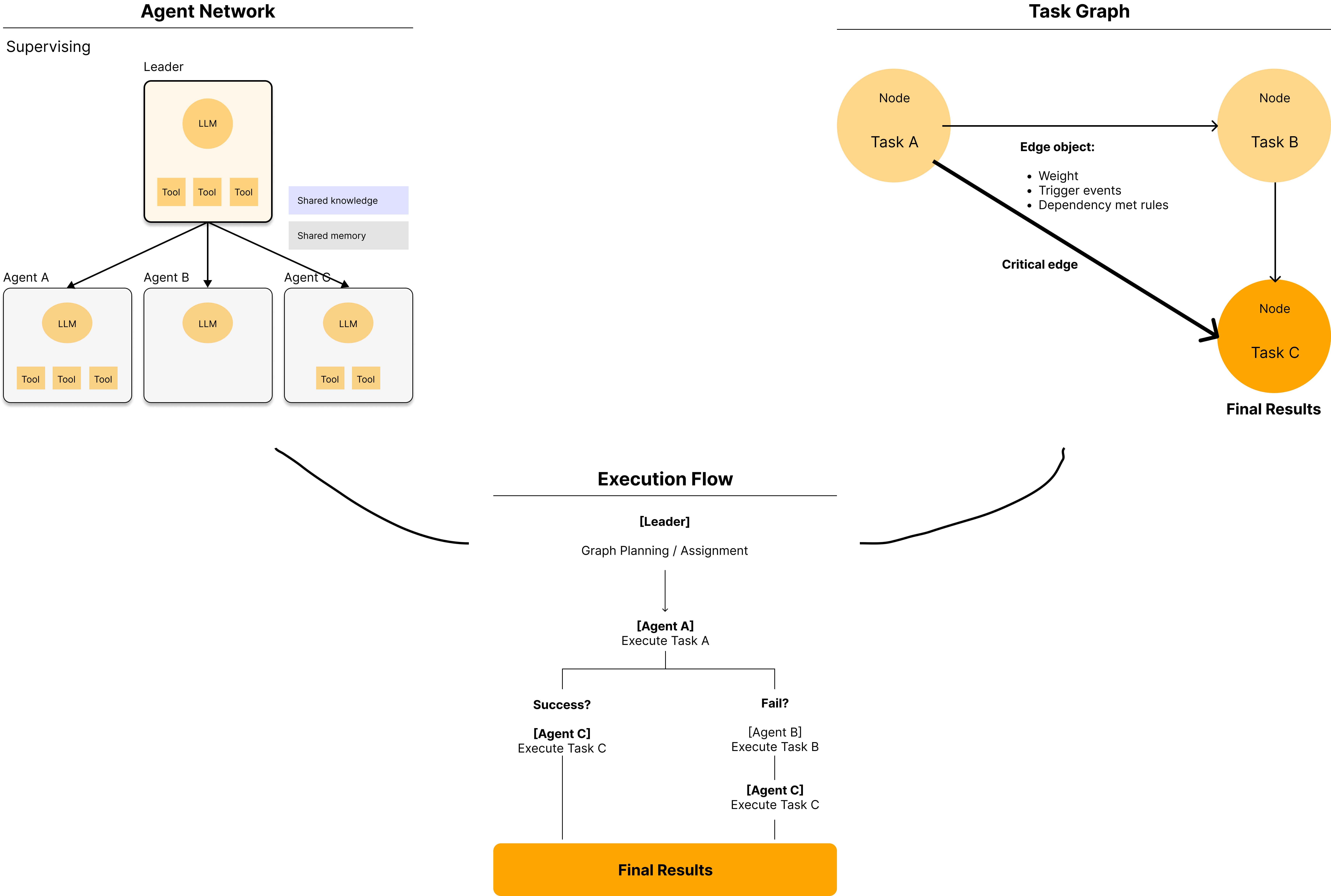
Ref: TaskGraph class
Optimization
Autonomous agents are model-agnostic and can leverage their own and their peers' knowledge sources, memories, and tools.
Agents are optimized during network formation, but customization is possible before or after.
The following code snippet demonstrates agent customization:
1import versionhq as vhq
2
3agent = vhq.Agent(role="Marketing Analyst")
4
5# update the agent
6agent.update(
7   llm="gemini-2.0", # updating LLM (Valid llm_config will be inherited to the new LLM.)
8   tools=[vhq.Tool(func=lambda x: x)], # adding tools
9   max_rpm=3,
10   knowledge_sources=["<KC1>", "<KS2>"], # adding knowledge sources. This will trigger the storage creation.
11   memory_config={"user_id": "0001"}, # adding memories
12   dummy="I am dummy" # <- invalid field will be automatically ignored
13)
14
Project Set Up
Installing package manager
For MacOS:
1brew install uv
2
For Ubuntu/Debian:
1sudo apt-get install uv
2
Installing dependencies
1uv venv
2source .venv/bin/activate
3uv lock --upgrade
4uv sync --all-extras
5
AssertionError/module mismatch errors: Set up default Python version using .pyenv
1pyenv install 3.12.8
2pyenv global 3.12.8  (optional: `pyenv global system` to get back to the system default ver.)
3uv python pin 3.12.8
4echo 3.12.8 >> .python-version
5
pygraphviz related errors: Run the following commands:
1brew install graphviz
2uv pip install --config-settings="--global-option=build_ext" \
3--config-settings="--global-option=-I$(brew --prefix graphviz)/include/" \
4--config-settings="--global-option=-L$(brew --prefix graphviz)/lib/" \
5pygraphviz
6
If the error continues, skip pygraphviz installation by:
1uv sync --all-extras --no-extra pygraphviz
2
Setting up a local env file
Create .env file at the root of the project directry and add your keys following .env.sample.
Architected by Kuriko Iwai

Share What You Learned
Kuriko Iwai, "Orchestrating Autonomous Agent Networks" in Kernel Labs
https://kuriko-iwai.com/labs/multi-agent-system-framework
Shipping AI Systems?
I help teams design and deploy scalable ML / RAG / LLM pipelines and MLOps infrastructure.
Or explore:
- Dive deeper 👉 Research Archive
- Learn by building 👉 AI Engineering Masterclass
- Try it live 👉 Playground
Related Books for Further Understanding
These books cover the wide range of theories and practices; from fundamentals to PhD level.

Linear Algebra Done Right

Foundations of Machine Learning, second edition (Adaptive Computation and Machine Learning series)

Designing Data-Intensive Applications: The Big Ideas Behind Reliable, Scalable, and Maintainable Systems

Machine Learning Design Patterns: Solutions to Common Challenges in Data Preparation, Model Building, and MLOps