CodeContext: Low-Latency Neural Code Search with ColBERT
Token-level late interaction, Redis semantic cache, and sub-100ms retrieval for real developer queries.
Try ColBERT late-interaction code search live: AST chunking, Redis cache hits, token heatmaps, and sub-100ms latency on a FastAPI retrieval stack.
Primary Features
- Interactive ColBERT late-interaction search over indexed code snippets.
- Token heatmap visualization showing which tokens drive MaxSim alignment.
- Redis semantic cache path with HIT / MISS latency telemetry.
- AST / Tree-sitter structural chunking for function-level retrieval.
- FastAPI microservice pattern ready for App Runner + ElastiCache.
- RAGAS-ready evaluation hooks and OpenLLMetry span tracing.
CodeContext Playground
Production-shaped neural code search: structural chunking → ColBERT late interaction → Redis semantic cache → ranked snippets.
Token-level retrieval with ColBERT
Pipeline: AST chunking → ColBERT MaxSim → Redis cache → ranked code
Part of Module 2 — CodeContext: Low-Latency Neural Code Search Engine in the AI Engineering Masterclass.
Tutorial: CodeContext — Low-Latency Neural Code Search Engine
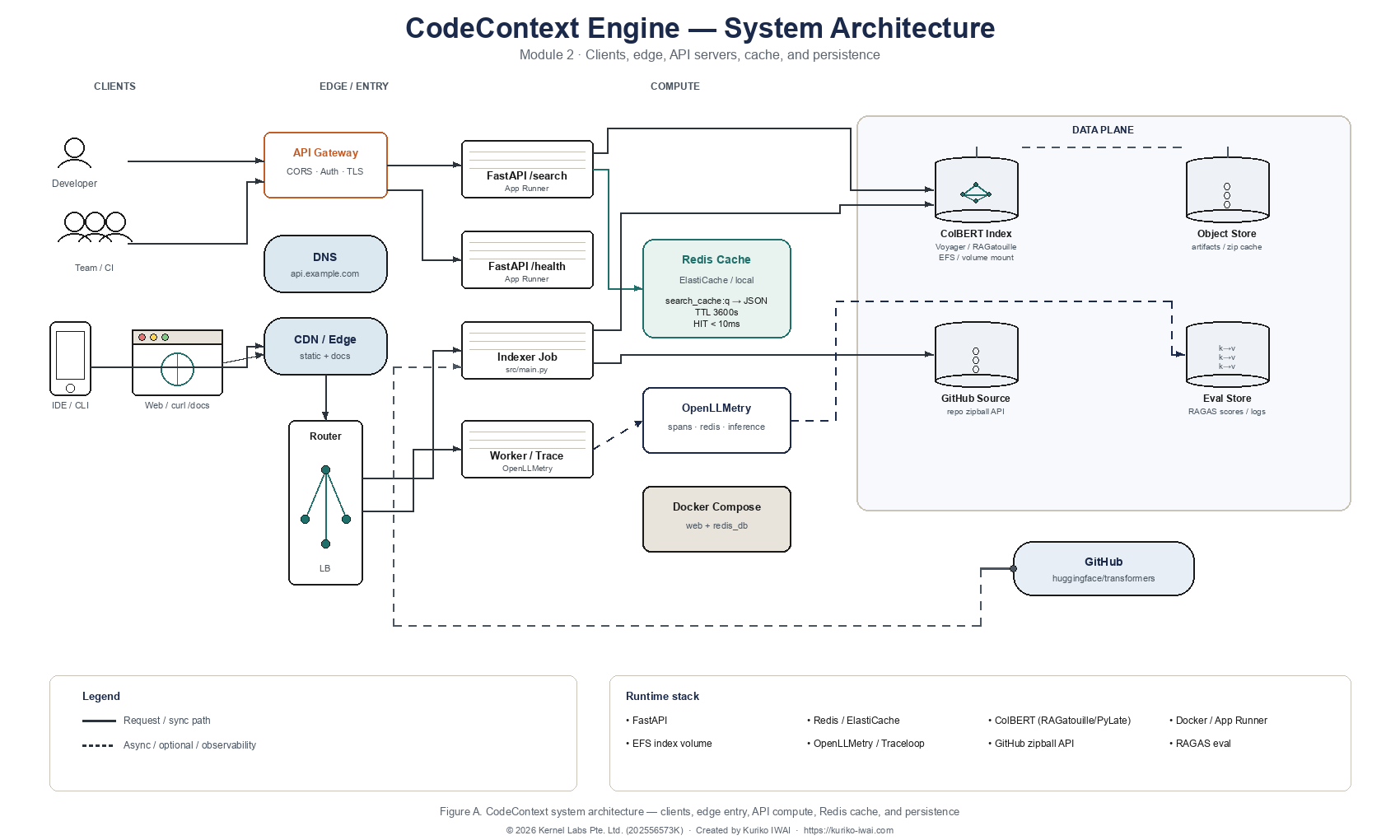
What We’ll Build - The System Architecture
In this module, we’ll implement CodeContext: a code-aware RAG framework that retrieves relevant source-code snippets from a GitHub repository and serves them through a FastAPI search endpoint.
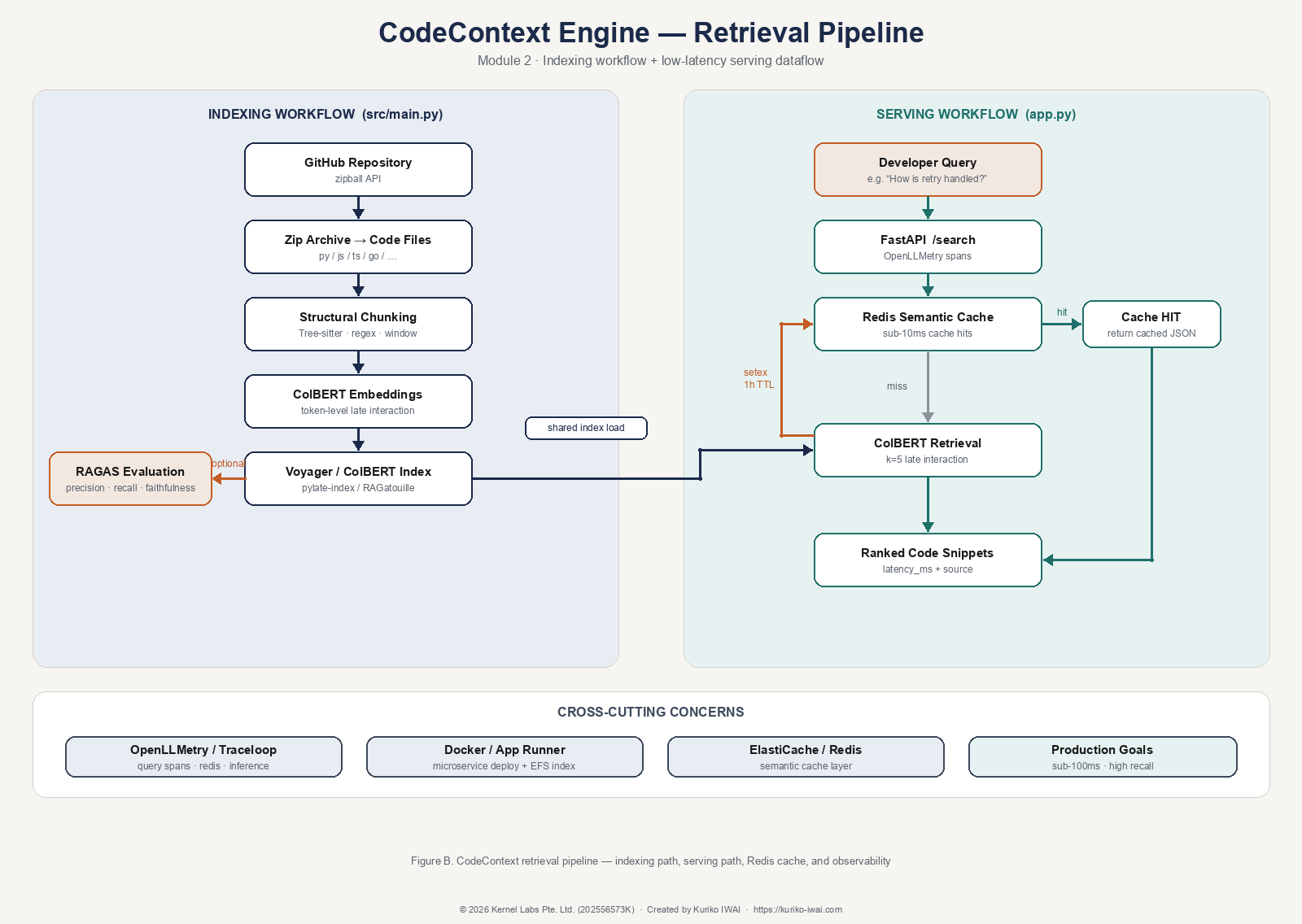
The workflow begins when a developer submits a natural-language query such as “How is retry logic handled?” The indexing pipeline downloads a GitHub repository, extracts supported code files, chunks classes and functions, and stores the chunks in a ColBERT-style retrieval index. The FastAPI backend then loads the index, checks Redis for cached results, retrieves matching chunks, and returns the answer candidates to the user.
◼ System Architecture
Kernel Labs | Kuriko IWAI | kuriko-iwai.com
Figure A. CodeContext system architecture — clients, edge/API gateway, FastAPI compute, Redis cache, ColBERT index / object / eval stores, and GitHub as the source corpus.
◼ Retrieval Pipeline
Kernel Labs | Kuriko IWAI | kuriko-iwai.com
Figure B. CodeContext retrieval pipeline — indexing workflow (src/main.py) and serving workflow (app.py + Redis HIT/MISS → ColBERT → ranked snippets).
Essential Source Flow
The module has one indexing path and one serving path:
1zip_bytes = fetch_repository_zip(repo_url=repo_url, branch=branch)
2chunks = chunk_source_code_from_zip(zip_bytes)
3pylate_model, pylate_index = index_codebase_pylate(chunks)
4
At serving time, /search checks Redis and then calls the ColBERT index:
1cache_key = f"search_cache:{q}"
2results = RAG.search(query=q, k=5)
3
Shipping AI Systems?
I help teams design and deploy scalable ML / RAG / LLM pipelines and MLOps infrastructure.
Or explore:
- Dive deeper 👉 Research Archive
- Learn by building 👉 AI Engineering Masterclass
- Try it live 👉 Playground
Repository Ingestion
The data pipeline starts by downloading a GitHub repository as a zip archive. This avoids cloning the repo manually and lets the system ingest any public repository from a URL.
1def fetch_repository_zip(repo_url: str, branch: str = "main", timeout: int = 30) -> bytes:
2    api_url = repo_url.rstrip("/").replace("github.com", "api.github.com/repos")
3    api_url = f"{api_url}/zipball/{branch}"
4
5    response = requests.get(api_url, timeout=timeout)
6    response.raise_for_status()
7    return response.content
8
Run the ingestion pipeline with the default repository:
1uv run python src/main.py
2
Or override the target:
1REPO_URL=https://github.com/owner/repo REPO_BRANCH=main uv run python src/main.py
2
Code Curation & Chunking
Before retrieval can work, raw files must be converted into meaningful searchable units. Instead of embedding an entire repository as one document, the system chunks code around functions, classes, methods, and fallback text windows.
The chunker supports common source-code extensions:
1EXTENSION_MAP = {
2    "py": "python",
3    "js": "javascript",
4    "ts": "typescript",
5    "go": "go",
6    "rs": "rust",
7    "java": "java",
8    "cpp": "cpp",
9    "c": "c",
10}
11
The chunking process uses three strategies:
Tree-sitter parsing: Extracts structured function, class, and method definitions.
Regex fallback: Finds common declaration patterns when Tree-sitter fails.
Sliding window fallback: Splits long files into overlapping line windows.
Each chunk stores both source text and metadata:
1{
2    "content": "File: app.py\nLang: python\nType: function_definition\n\n...",
3    "metadata": {
4        "type": "function_definition",
5        "file": "app.py",
6        "line_start": 123,
7    },
8}
9
ColBERT Retrieval
Most embedding systems compress a whole document into one vector. ColBERT uses late interaction: it embeds query tokens and document tokens separately, then scores each query token against its best matching document token.
The high-level score is:
1score(query, document) = sum over query tokens of max matching document-token similarity
2
In code, the project creates a lightweight ColBERT model and a Voyager index:
1model = models.ColBERT(
2    model_name_or_path="lightonai/answerai-colbert-small-v1",
3    trust_remote_code=True,
4)
5
6index = indexes.Voyager(
7    index_folder="pylate-index",
8    index_name="code_base",
9    override=True,
10    embedding_size=96,
11)
12
Then it encodes and indexes the chunks:
1contents = [chunk["content"] for chunk in chunks]
2document_embeddings = model.encode(contents, is_query=False, batch_size=16)
3index.add_documents(documents_ids=contents, documents_embeddings=document_embeddings)
4
Retrieval-Augmented Answering
At query time, the retriever embeds the user question and returns the top matching chunks:
1def get_chunks(self, question: str, k: int = 3) -> list[str]:
2    query_embedding = self.model.encode([question], is_query=True)
3    results = self.retriever.retrieve(queries_embeddings=query_embedding, k=k)
4    return [self._extract_document(result) for result in results[0]]
5
The retrieved code can then be passed to an LLM as context:
1prompt = f"Code Context:\n{context_text}\n\nQuestion: {question}\nDetailed Answer:"
2response = self.llm.invoke(prompt)
3
Shipping AI Systems?
I help teams design and deploy scalable ML / RAG / LLM pipelines and MLOps infrastructure.
Or explore:
- Dive deeper 👉 Research Archive
- Learn by building 👉 AI Engineering Masterclass
- Try it live 👉 Playground
FastAPI Inference Service
The serving layer exposes the retrieval system through two endpoints:
1GET /health
2GET /search?q=<query>
3
When the API starts, it connects to Redis if available and loads the configured index in the background:
1asyncio.create_task(load_index_background())
2
The search endpoint follows a simple inference workflow:
Redis cache lookup: Return cached results for repeated queries.
Index readiness check: Return an error if the search index is not loaded.
ColBERT search: Retrieve the top matching code chunks.
Cache write: Store fresh results for one hour.
1cache_key = f"search_cache:{q}"
2results = RAG.search(query=q, k=5)
3await redis_client.setex(cache_key, 3600, json.dumps(results, default=json_default))
4
Configuration
Create a .env file:
1REDIS_HOST=localhost
2REDIS_PORT=6379
3COLBERT_INDEX_PATH=.ragatouille/colbert/indexes/CodeBaseIndex
4CORS_ORIGINS=http://localhost:8000,https://kuriko-iwai.com
5ENABLE_TRACELOOP=false
6OPENROUTER_API_KEY=...
7
Optional Redis cache:
1brew install redis
2brew services start redis
3
Run the System
Install dependencies:
1uv sync
2
Build or test retrieval:
1uv run python src/main.py
2
Start the API:
1uv run python app.py
2
Or start with Docker:
1docker-compose up --build
2
Check the service:
1curl "http://127.0.0.1:8000/health"
2
Search the codebase:
1curl "http://127.0.0.1:8000/search?q=where+is+retry+logic+handled"
2
Evaluation
The full pipeline can optionally generate synthetic questions and evaluate retrieval-augmented answers with RAGAS:
1RUN_RAGAS_EVAL=true uv run python src/main.py
2
The project tracks metrics such as context precision, context recall, faithfulness, and answer relevancy.
Shipping AI Systems?
I help teams design and deploy scalable ML / RAG / LLM pipelines and MLOps infrastructure.
Or explore:
- Dive deeper 👉 Research Archive
- Learn by building 👉 AI Engineering Masterclass
- Try it live 👉 Playground
Deployment
The production setup has two core components:
-
FastAPI microservice: Serves /health and /search over HTTP.
-
Redis cache: Reduces repeated retrieval latency for identical queries.
For containerized local deployment:
1docker-compose up --build
2
For AWS deployment, keep the index on persistent storage such as EFS so the service can update retrieval data without rebuilding the container image.
Smoke Test
Run:
1uv run bash scripts/test.sh
2
This compiles the Python files and verifies that /health and /search are registered.
Architected by Kuriko IWAI

Share What You Learned
Kuriko IWAI, "CodeContext: Low-Latency Neural Code Search with ColBERT" in Kernel Labs
https://kuriko-iwai.com/labs/code-context-colbert
Shipping AI Systems?
I help teams design and deploy scalable ML / RAG / LLM pipelines and MLOps infrastructure.
Or explore:
- Dive deeper 👉 Research Archive
- Learn by building 👉 AI Engineering Masterclass
- Try it live 👉 Playground
Continue Your Learning
If you enjoyed this blog, these related entries will complete the picture:
How to Build Reliable RAG: A Deep Dive into 7 Failure Points and Evaluation Frameworks
Understanding Vector Databases and Embedding Pipelines
How to Design a Production-Ready RAG System (Architecture + Tradeoffs) (2026 Edition)


Related Books for Further Understanding
These books cover the wide range of theories and practices; from fundamentals to PhD level.

Linear Algebra Done Right

Foundations of Machine Learning, second edition (Adaptive Computation and Machine Learning series)

Designing Data-Intensive Applications: The Big Ideas Behind Reliable, Scalable, and Maintainable Systems

Machine Learning Design Patterns: Solutions to Common Challenges in Data Preparation, Model Building, and MLOps